
Fever: Events & Tickets
Fever LabsEvents
4.74.07K Reviews
- Version
- 5.251.1
- Installs
- 10.00M
- Age Rating
- Teen
Screenshots

Our Review of Fever: Events & Tickets
 Analysis by Appyee
My first week with Fever: Events & Tickets would be about discovery rather than planning a packed calendar. The app is built around finding things to do nearby, and that makes it useful when I know I want to go out but have no particular show or venue in mind. I can browse a mix of events, save possibilities, and compare ideas before committing. That open-ended browsing is its strongest first impression: it can turn “let’s do something this weekend” into a shortlist without requiring me to search every venue separately.
That strength comes with a practical caveat. A curated feed is a starting point, not a complete map of everything happening in a city. I would use it to uncover options, then check the event details carefully before making plans: the date, location, timing, and ticket terms matter more than a compelling image or recommendation. For a specific artist, venue, or event I already know I want, going directly to the organizer or venue may be quicker. Fever is most helpful when I am still deciding what kind of outing sounds good.
Why the first week feels lively
Fever is an events app from Fever Labs, and its focus is easy to understand: help people find and book experiences across cities including New York, Los Angeles, Chicago, Washington, D.C., and Miami. The range makes it appealing to locals as well as people visiting one of those places. I would not treat it as a guide to every activity in every town, though. Its usefulness depends on having relevant listings where I am, so the first thing I would do is browse my area and see whether the choices match my tastes.
The early appeal comes from variety. A person who usually defaults to dinner and a movie can use the feed to look for a live performance, a food-focused outing, or something more unusual. That does not mean every recommendation will be a winner for every person. It means the app gives me a convenient way to notice possibilities I might not have thought to search for, which is a good reason to try it when my plans are still flexible.
From discovery to a habit that lasts
I find the lasting value of Fever depends less on how often I browse than on whether it helps me turn a vague idea into a plan I’ll actually enjoy. In this section, I’d look at the small habits that keep discovery useful without letting saved options or reminders become clutter, then consider how that balance shapes the app’s place in a regular routine.
Keeping plans manageable month to month
After the novelty of browsing wears off, the app needs to help me make decisions rather than simply keep me scrolling. Saving an event can help when I am comparing a few options, and reminders are useful once a plan is made. My practical approach would be to save only events I might genuinely attend, then revisit that shortlist when I am ready to choose. Otherwise, a pile of possibilities can become clutter instead of a useful planning tool.
A realistic use case is a midweek check for something to do on Saturday. I could browse after work, save two or three options, and send the shortlist to a friend so we can settle on one plan. Before buying, I would check whether the date and location work for everyone and whether the event description answers the questions that matter to our group. That small pause is worthwhile: easy booking is convenient, but it should not replace checking what I am actually signing up for.
Fever is free to download, which makes it easy to test without first paying for the app itself. Tickets and the events themselves are a separate matter, so I would review the purchase details before confirming anything. The app is rated Teen, a useful point for families considering whether it suits a younger user, though the event itself should still be judged on its own content and age guidance.
What changes with repeated use
Personalized suggestions can make repeat visits more relevant, especially if I regularly look for certain kinds of outings. But personalization is not a substitute for deliberate browsing: if I keep choosing the same type of event, I may see less variety than I want. When I am trying to break out of a routine, I would search beyond the familiar picks and treat recommendations as prompts, not instructions.
The social element can help when a plan depends on friends, because seeing what others are attending may give a group a starting point. I would still confirm directly with the people involved rather than assume a visible activity means they are available or that a ticket is secured for me. For a large group, agreeing on the event first and having each person check their own booking is a safer workflow than relying on a shared signal in the app.
Friction, fatigue, and the alternatives
The main trade-off is that convenience can narrow the search. An app with a curated selection is good at surfacing tempting ideas, but I would not assume it includes every local event or offers the best route for every purchase. A venue’s own page is often a better destination when I already know where I want to go; a broad city calendar can be better when I want the widest possible overview. I would keep Fever for discovery and use those alternatives when completeness or a specific organizer matters more.
There is also a limit to how often event browsing feels fresh. If my city has few listings that fit my budget, schedule, or interests, recommendations cannot solve that mismatch. Frequent notifications can become easy to ignore, too, so I would keep only reminders that help me act on plans rather than letting every nudge compete for attention. The app earns a place on my phone when it leads to an outing I would otherwise have missed, not merely because it gives me another feed to check.
Who should keep it installed
I would recommend Fever to people who enjoy going out but do not always know what to look for, and to visitors who want a practical way to browse experiences in a city the app serves. It is especially useful for flexible planners: people who can choose among several kinds of activities and are willing to check the details before booking. Someone who already follows a small set of venues, wants a comprehensive calendar, or prefers to plan entirely through direct organizer channels may get more value from other tools.
The app has an average rating of 4.7 from around 127,000 ratings, with over 10 million installs. Those figures suggest it has found a substantial audience, but they cannot tell me whether its listings suit my neighborhood or whether a particular event is right for me. I would judge it by a simple test: does a short browse help me find a real plan I want to make? If not, there is little reason to keep checking it out of habit.
Discovering Events Made Easy
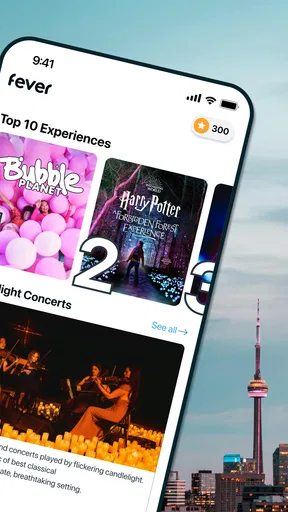
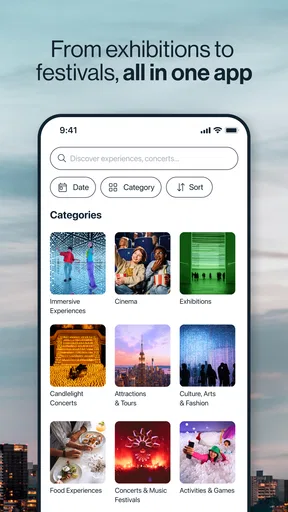
First things first, the app's interface is super user-friendly. You know how some apps are just a pain to navigate? Not Fever: Events & Tickets. It’s like it anticipates your needs. The main screen greets you with a curated list of events based on your location and interests. You can easily scroll through concerts, theater shows, food festivals, and even those quirky little events you didn’t know you needed until now.
Booking Tickets: A Breeze
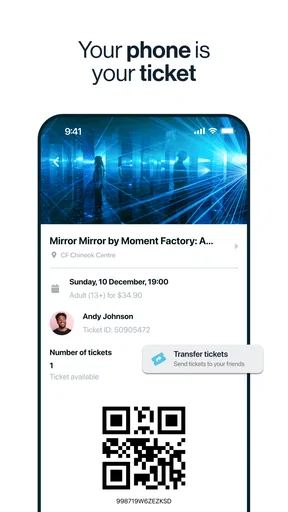
Now, here's where it gets even better. Booking tickets is as simple as pie. No more jumping through hoops with endless redirects. Just a couple of taps and you’re done. There's also an option to save events you're interested in, so you don’t miss out if you're still on the fence.
One of my favorite features is the ability to see what your friends are attending. It’s like having a social network within the app. You can plan group outings with ease or just spy on what everyone else is up to. No judgment here!
Personalized Recommendations
Let’s talk recommendations. The app uses your past activities and preferences to suggest events you might dig. It’s pretty spot-on most of the time, which is great because it feels like having a personal event planner in your pocket. Plus, the more you use it, the better it gets at making suggestions.
If you're like me and sometimes forget about events you've planned to attend, the app sends handy reminders. These notifications ensure you never miss a beat, literally and figuratively.
Final Thoughts
Overall, Fever: Events & Tickets is an app that delivers on its promise. It’s the ultimate companion for those who crave experiences and want an easy way to access them. Whether you're a social butterfly or just looking to try something new, this app has you covered. So go ahead, give it a whirl, and let it guide you to your next adventure.
There is a maintenance cost even when the app itself costs nothing: attention. I would open it with a purpose, such as finding a plan for a free evening, rather than checking it several times a day. Saving a short list and clearing out options after a decision keeps the app useful without turning it into another inbox. If reminders are helpful, they should support a plan I have actually chosen; if they become background noise, I would adjust or ignore them rather than let notifications create pressure to go out.
For someone deciding whether to keep it installed, I would also consider how they make plans. If I like spontaneous outings and enjoy comparing unfamiliar experiences, the mix of discovery and ticket booking can earn a regular place on my phone. If I have a fixed routine, rarely attend events, or prefer to buy directly from a venue I already trust, Fever may be something I open occasionally rather than a lasting habit. That is not a flaw so much as a question of fit: its value rises when I am actively looking for something new.
Fever Labs’ app is free, and version 5.178.0 runs on Android 7.0 or later. With 3.8 thousand reviews, it has plenty of public feedback to browse if I want another perspective, but I would still make my own judgment from the listings available in my city. For me, its lasting value is not that it replaces every event source; it is that it can make the first step toward an outing easier. I would keep it when that discovery reliably turns into plans, and let it go if browsing becomes the activity instead of a route to one.
Privacy and Permissions
See what permissions an app requests and how it handles your data.
- Contacts
- read your contacts
- Location
- approximate location (network-based), precise location (GPS and network-based)
- Photos/Media/Files
- read the contents of your USB storage, modify or delete the contents of your USB storage
- Storage
- read the contents of your USB storage, modify or delete the contents of your USB storage
- Camera
- take pictures and videos
- Other
- view network connections, expand/collapse status bar, full network access, run at startup, control vibration, prevent device from sleeping, Google Play license check, read Google service configuration
Verdict
Strengths of Fever: Events & Tickets
- Easy-to-navigate interface.
- Wide variety of events listed.
- Personalized recommendations.
- Secure ticket purchasing.
- Event reminders and updates.
Limitations of Fever: Events & Tickets
- Limited event locations.
- Occasional app crashes.
- High service fees.
- Inconsistent customer support.
- Some events sell out quickly.
Similar Picks in This Category
View All
Easy Quran Mp3 Audio Offline
Muslim Worldapp4.7

Invitation Maker: Cards & RSVP
Greetings Island4.9

StubHub - Live Event Tickets
StubHub4.3

Epic Freebie Games Radar
Arioch Pds - Apps & Games4.4

Invitation card Maker, Design
Splendid App Maker4.9

All Invitation Card Maker App
Fast Video Downloader & Story Saver - DevBay4.2
Frequently Asked Questions
What is Fever: Events & Tickets, and how does it work?
Fever: Events & Tickets is an app designed to help users discover and book tickets for a wide range of events in their city. It utilizes a personalized recommendation system based on your interests and past activity, making it easy to find concerts, exhibitions, nightlife, and more. Users can browse events, read detailed descriptions, and purchase tickets directly through the app.
Is Fever: Events & Tickets available in my city?
Fever is continually expanding its reach and currently supports several major cities worldwide. To check if it’s available in your area, you can download the app and enter your location. The app will automatically show available events in your vicinity if supported. Visit their website for a complete list of current cities served.
How does Fever ensure the security of my payment information?
Fever implements robust security measures to protect your payment information. The app uses encryption protocols to secure transactions and stores data in compliance with industry standards. Users can confidently purchase tickets knowing that their personal and financial information is safeguarded against unauthorized access.
Can I get a refund if I’m unable to attend an event?
Refund policies for Fever: Events & Tickets vary depending on the event. Some events may offer refunds or exchanges, while others may not. It’s essential to review the specific refund policy for each event before purchasing tickets. You can find this information within the event details on the app or contact Fever’s customer support for assistance.
Are there any additional fees when purchasing tickets on Fever?
When purchasing tickets through Fever, there may be additional service fees or taxes added to the ticket price. These fees are transparently displayed during the checkout process, ensuring users are aware of the total cost before completing their purchase. It's advisable to review the final price breakdown before confirming your order.
